


mybyram: Medical Supply Orders
4.61.47K Reviews
App Specs
- Version
- 1.5.2
- Updated On
- License
- Free
- Downloads
- 100,000+
- Developer
- Accendra Health
- Categories
- Medical
- Platform
- Android
Screenshots
 Analysis by AppCompare
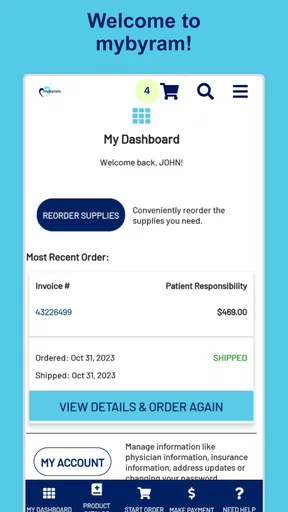
Managing medical supplies is rarely something people want to make more complicated than it already is. The useful question is whether a phone can make a routine reorder easier without creating another source of stress. After spending time with mybyram: Medical Supply Orders, I see it as a focused account-access tool rather than a broad health-management app. It is made for people who already use a mybyram account and want a more convenient way to reorder supplies from a mobile device.
That narrow purpose is also its main strength. I would not recommend it to someone looking for symptom tracking, medication reminders, appointment scheduling, or general medical advice. This is a medical app from Accendra Health with a practical job: helping users reach their existing account and handle supply reorders. The free price and Everyone content rating make it approachable, while the app’s value depends much more on whether mybyram is already part of your supply routine.
How mybyram feels when connectivity matters
I find connectivity shapes the whole experience because the app’s main job depends on reaching an existing account, not working as an offline supply planner. Before I begin, I’d make sure I have a reliable connection and enough time to check that the reorder reached its intended state. That simple preparation leads to the next question: what can I do when the connection interrupts the process?
The app is most useful when the account is already part of your routine
The first thing I noticed is how dependent the experience is on reaching the account service. This is not a self-contained checklist where I can prepare everything without a connection. The important work involves signing in, viewing account-related information, and placing a reorder, so the app makes the most sense when the phone can communicate with the service.
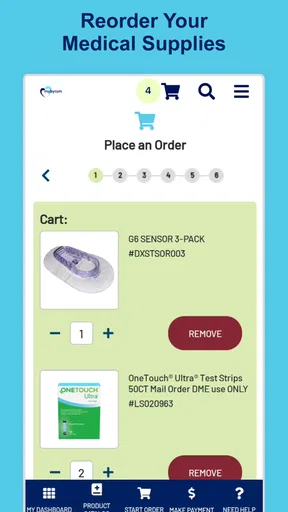
That matters in everyday situations. Imagine noticing that your supply cabinet is getting low while you are away from home. With the app installed, you do not have to wait until you are back at a computer to begin the process. If the connection is stable and your account details are ready, the phone becomes a convenient starting point for the reorder. That is a small improvement, but for recurring medical supplies, removing one small delay can be genuinely helpful.
I also found that the app’s focused design changes how I judge it. I am not expecting a rich dashboard filled with health graphs or educational material. I am looking for a quick path from opening the app to dealing with an account task. For that purpose, a simple interface is preferable to a crowded medical portal. The trade-off is that users wanting broader health tools may find the app limited almost immediately.
Mobile access helps, but it does not remove planning
A phone is useful for reordering because it is usually nearby when a practical need appears. I can picture using this while checking a cupboard, preparing for travel, or reviewing household tasks. The advantage is not that the app transforms supply management; it is that it puts the account in the same place as the reminder to act.
Worth Reading Before You Choose

EA SPORTS FC Mobile 26 Is a Bigger Football Game, but It Takes Time

Flipboard Shows What News Apps Must Do Beyond the Feed

Switching to Android Auto Means Rethinking Your Driving Routine

Google Calendar Makes a Crowded Week Easier to Manage

Ludo King Makes the Most of the Minutes Between Plans

Baby Panda World Brings Quick Play to Modern Phones, but Its Game Library Feels Busy
Still, I would not treat mobile access as a substitute for keeping track of stock. The app can make an order easier to start, but it cannot make a nearly empty supply last longer. My preferred habit would be to check supplies at a calm moment, then use the app before the situation becomes urgent. That approach is especially important for products that are difficult to replace at short notice.
There is another practical distinction between using this app and using a browser. A browser may be better when I need to compare several pages, read extensive account information, or work from a larger screen. The mobile app is more appealing when the task is familiar and specific. I can open it during a short break and deal with the reorder without setting up a laptop. In other words, the app is strongest as a repeat-use shortcut, not necessarily as the best environment for exploring every part of an account.
What happens when the connection is unreliable
Connectivity is the main point where expectations need to stay realistic. If the service cannot be reached, the central account action cannot be completed at that moment. A weak signal in a basement, a crowded public network, or a temporary service problem can turn a simple reorder into a task that needs to be resumed later.
My advice is to avoid starting an important reorder at the last possible moment or while moving between unreliable networks. A better workflow is to open the app when you have a dependable connection, confirm that the account loads properly, and complete the process in one sitting. This is not exciting advice, but it is the kind of habit that prevents a convenience tool from becoming a source of last-minute frustration.
If loading stalls, I would first check whether other apps can reach the internet, then switch between a trusted Wi-Fi connection and mobile data if available. I would avoid repeatedly tapping buttons while waiting, because uncertainty about whether an action went through can create confusion. After reconnecting, checking the account status before trying again is the safer approach. The app is useful, but it should be treated as a connected gateway rather than an independent record of completed orders.
Recovery requires a calm, deliberate workflow
The most important recovery habit is to separate a connection problem from an account problem. If the app does not load, that does not automatically mean the account is wrong. I would test the network first, reopen the app, and then try again only after the connection seems steady. If the account itself is the issue, the sensible next step is to use the available account-support route rather than repeatedly submitting the same request.
I would also keep an eye on the final state of a reorder. When a network interruption occurs during an important action, the user needs to know whether the request was accepted, left unfinished, or still requires attention. The safest personal routine is to look for a clear confirmation in the account experience and, if the result remains unclear, contact the appropriate support channel before placing a duplicate order.
This is one area where a traditional computer browser may be preferable. A larger screen makes it easier to keep track of what loaded, what did not, and which page I am currently viewing. The phone remains convenient for straightforward tasks, but recovery from an uncertain session can be less comfortable on a small display. I would choose the app for speed and the browser for investigation when something goes wrong.
Use it with sensible data habits
Because this is a medical account app, I would use it with the same care I apply to any service containing personal health-related details. I would avoid signing in on a shared device, be cautious with public Wi-Fi, and lock my phone with a screen-security method. These are not reasons to avoid the app; they are sensible boundaries for mobile account access.
I would also avoid leaving the app open while handing the phone to someone else. A quick reorder task can feel harmless, but account screens may still reveal information that I would rather keep private. Using a personal device, closing the session when finished, and keeping the operating system current are simple steps that make mobile access more comfortable.
Data-conscious use also means choosing the right network for the task. I would not begin a supply order in a place where the connection repeatedly drops, especially if I am unsure whether the action has completed. Waiting until I have a stable connection is usually less frustrating than trying to force the process through a poor one. The app’s convenience comes from dependable access, not from using it in every possible location.
Who will get the most from this app?
The clearest audience is someone who already has a mybyram account and regularly needs to reorder medical supplies. For that person, the app can reduce the friction between remembering the task and reaching the account. Caregivers may also appreciate having a mobile route for handling a familiar reorder, provided they are authorized to manage the relevant account and are comfortable protecting the login.
I would be more hesitant to recommend it to someone who only needs a one-time purchase, does not use mybyram, or prefers handling medical administration through a desktop. The app’s purpose is specific enough that installing it without a matching account workflow may not provide much benefit. Likewise, anyone expecting clinical guidance or a complete personal health record should look for a different kind of medical app.
Its audience is reflected in its adoption: the app has passed one hundred thousand installs and holds a 4.6 average from around fifteen thousand ratings, with roughly one and a half thousand written reviews. Those figures suggest that many users find the focused account function worthwhile, although they do not change the basic trade-off. A strong rating cannot make a specialized reorder tool suitable for someone who needs broader healthcare features.
Version, access, and everyday practicality
The current version is 1.5.2, and the app runs on Android 7.0 or later. That makes compatibility worth checking before installing it on an older phone. I would also make sure the device has enough room for routine app updates and that its system is maintained, since account access is more reassuring when the phone itself is not neglected.
There is no purchase price to add another barrier: the app is free. That does not mean every medical supply transaction is free; it simply means the app itself does not require a charge to install. I appreciate that distinction because it keeps the decision straightforward. If the service matches your account needs, trying the app does not require committing money to the download.
The Everyone age rating is also consistent with the app’s practical purpose. Even so, an age label should not be confused with permission to manage another person’s medical account. Families and caregivers still need to handle access responsibly. The app may be easy to install, but account authority and privacy remain personal responsibilities.
Small habits that make the mobile workflow better
My first tip is to reorder from a planned check rather than from panic. Keep a regular moment for looking at remaining supplies, then use the app while the connection is strong. This turns the phone from an emergency tool into part of a predictable routine.
My second tip is to distinguish convenience from confirmation. Opening the app and beginning a reorder is not the same as knowing the request is complete. I would always review the final account state before putting the phone away, especially after a slow connection or an unexpected interruption.
My third tip is to choose the device based on the task. Use the phone when the reorder is familiar and you are away from a desk. Move to a browser or another support route when you need to investigate an account issue, read a large amount of information, or recover from an uncertain submission. This simple division prevents the app from being judged unfairly for jobs it was not designed to handle.
My fourth tip is to prepare before leaving home if supplies are important during travel. I would not rely on discovering a low stock level in an airport, on a train, or in a location with weak reception. The app can make a planned reorder more convenient, but planning still matters more than the device used to place it.
My connectivity verdict
After using it as a focused medical account tool, I think mybyram: Medical Supply Orders is a sensible choice for the right user. Its best quality is its directness: it brings a familiar reorder task onto a phone and avoids pretending to be a complete healthcare platform. For recurring supply management, that can be enough to justify keeping it installed.
The limitation is equally clear. The experience depends on account access and a working connection, so it is not the app I would rely on for disconnected preparation or for solving every problem related to a medical order. When the network is weak or the account needs investigation, a browser or direct support route may be more effective. That is not a failure of the app; it is the natural boundary of a connected ordering tool.
Overall, I would recommend it to existing mybyram users who want a free, mobile way to reach their account and place routine reorders. I would skip it if I needed clinical features, offline planning, or a broad health-management system. Its real value is reducing the distance between noticing a supply need and taking action, as long as I use it with a stable connection and a sensible backup plan.
Pros
- Easy reordering for recurring medical supplies
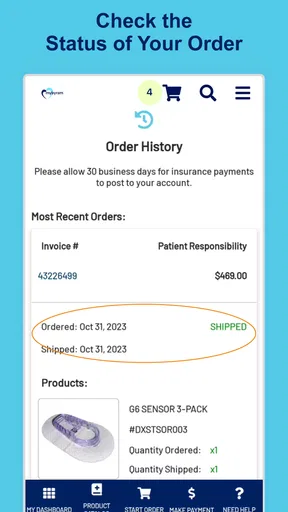
- Order status updates help track deliveries
- Supports prescription and supply management
- Secure account access protects personal health details
- Useful for caregivers managing orders for others
Cons
- Availability may depend on insurance and approved suppliers
- Some items may require prescription verification
- Delivery times can vary by product and location
- Account setup may take time for insurance details
- Not all medical supplies may be eligible for online ordering
FAQs for mybyram: Medical Supply Orders
What is mybyram: Medical Supply Orders used for?
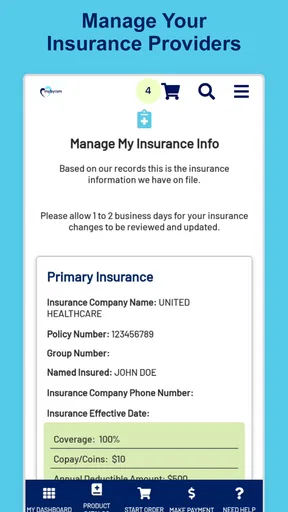
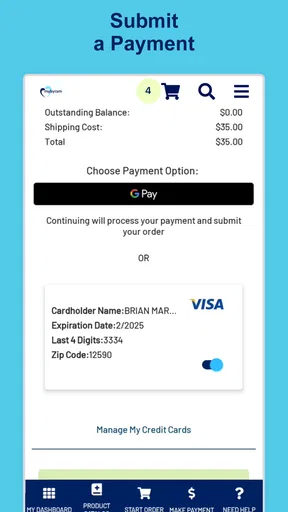
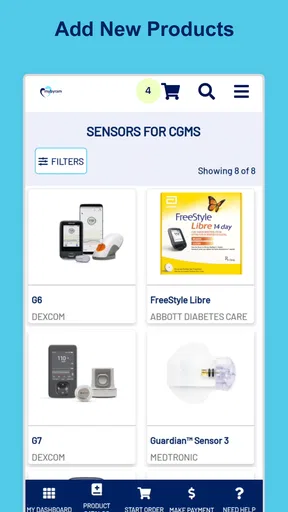
mybyram: Medical Supply Orders is designed for customers of Byram Healthcare to manage medical supply needs from a mobile device. After signing in, users can browse eligible products, place or reorder supplies, review order information, and track shipments. It is primarily intended to simplify recurring medical supply orders rather than replace professional medical advice or diagnosis.
Who can use the mybyram app, and is a Byram account required?
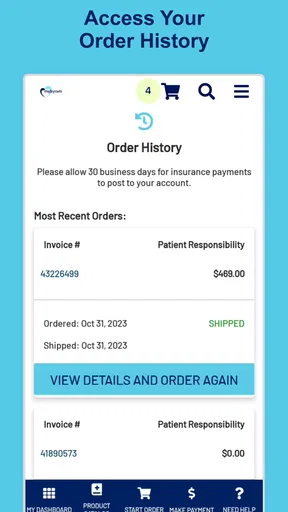
The app is intended for existing Byram Healthcare customers and generally requires an eligible account with appropriate login credentials. Access to products, insurance information, order history, and reorder options may depend on your customer profile and coverage. If you are new to Byram or cannot sign in, you may need to complete registration or contact Byram support before ordering.
Can I order medical supplies through the app using insurance?
The application may allow eligible users to order covered medical supplies while displaying information connected to their Byram account and insurance benefits. However, coverage, copayments, deductibles, prior authorization, prescriptions, and required documentation can vary by plan and product. Always review the final order details and contact your insurer or Byram if the expected coverage is unclear.
Can I reorder recurring supplies and track my delivery?
One of the app’s most useful features is the ability to manage repeat medical supply orders without starting the process from scratch. Depending on your account and product eligibility, you may be able to reorder previous items, check order status, and follow shipment updates. Availability can differ by supply type, prescription requirements, and insurance approval.
Is my personal and medical information secure in mybyram?
Because the app handles account, order, insurance, and potentially health-related information, users should protect access with a strong, private password and avoid signing in on shared devices. Byram applies security and privacy measures to its services, but no online platform is completely risk-free. Keep the app updated, sign out when appropriate, and contact support about suspicious activity.


